
How to Build a Bedtime Audio Routine with a Pillow Speaker

Share
For a simple bedtime audio routine, choose one familiar track, position Dreamery QuietSide beside your pillow or QuietSide Pro beneath it, and start at a low volume. Both offer 30, 60 and 90 minute timers. If you prefer wearable audio, Deepsleep combines a Bluetooth speaker mask with eye coverage; check your audio app for a timer. Keep listening optional.
A familiar chapter, a little music or the sound of rain can be a lovely way to mark the end of a busy day. Keep your bedtime audio routine small: one source of sound, a comfortable setup and an easy stopping point.
1. Choose your audio before you get comfortable
Pick a track you already know, a short podcast or an audiobook chapter you do not mind pausing. If choosing an app feels like another chore, use a built-in sound on your pillow speaker. You do not need a new playlist every night, and you do not need audio every night either.
2. Set up the model you own
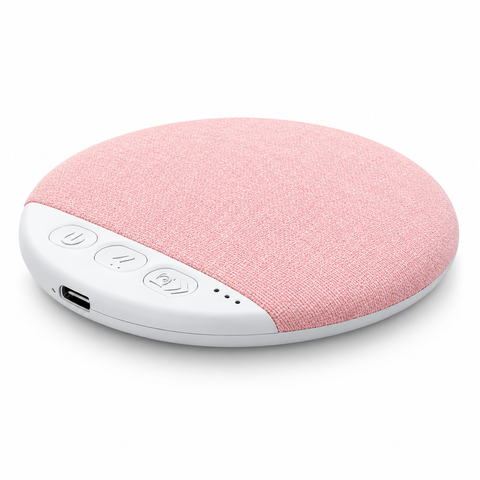
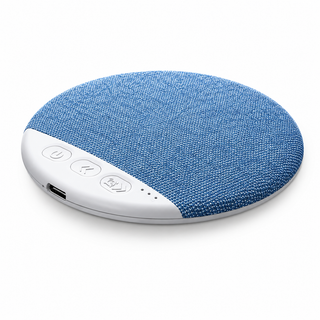
The Dreamery QuietSide Bluetooth Pillow Speaker is designed to sit beside or near your pillow. The QuietSide Pro Under-Pillow Speaker is designed for placement beneath it. Follow your model's instructions rather than treating every pillow speaker as interchangeable.
| Model | Set it up | Choose playback | Set an end point |
|---|---|---|---|
| QuietSide | Beside or near the pillow | Bluetooth or built-in ambient sounds | 30, 60 or 90 minute device timer |
| QuietSide Pro | Beneath the pillow near your ear | Bluetooth, eight built-in sounds or compatible TF/microSD files | 30, 60 or 90 minute device timer |
| Deepsleep Bluetooth Sleep Mask | Adjust the strap and internal speakers for a comfortable fit | Stream from a compatible Bluetooth device | Check your audio app for a timer; do not assume QuietSide's timer controls apply |
Start at a low volume while awake. Try small placement changes before turning it up, especially with QuietSide Pro: pillow thickness and filling affect how the sound reaches you. Our guide to how an under-pillow speaker works explains placement in more detail.
3. Give the audio a stopping point
QuietSide and QuietSide Pro both offer 30, 60 and 90 minute timers. Choose the period you want and practise setting it before you are tired. A 30 minute setting is one option for a shorter listening session; it is not a target for falling asleep. Switch the audio off earlier whenever you prefer.
For less phone handling, QuietSide Pro can play one of its eight built-in sounds or compatible audio files from a TF/microSD card. Check the supplied instructions for supported cards and files before preparing your audio. If you stream from an app, check its playback and autoplay settings ahead of time.
4. Check the arrangement with your partner
A pillow speaker does not promise silent listening for everyone else. With your usual bedding in place, play your chosen audio at a low level and ask whether it is audible on the other side of the bed. Adjust placement and volume together. If your preferences differ, listen earlier in the evening or switch it off.
5. Add eye coverage only if you want it
You can pair a pillow speaker with a separate Dreamery sleep mask if you enjoy eye coverage. Start with the mask's fit in your usual resting position; there is no need to add more accessories to make the routine complete.
If you would rather combine eye coverage and audio in one item, the Dreamery Deepsleep Bluetooth Sleep Mask with Headphones is an alternative to the pillow speaker. Adjust its strap and speaker position without forcing a tight fit. Deepsleep has no active noise cancellation. Check your chosen audio app for a sleep timer rather than assuming the mask has QuietSide's controls.
For help choosing between these arrangements, read pillow speaker vs headphones and Bluetooth masks. Keep one audio source playing at a time so the setup stays easy to control.
A simple evening checklist
- Choose your track or built-in sound before settling in.
- Follow your model's power and charging instructions, keeping cables clear of your resting space.
- Position the speaker, or adjust the mask, while awake.
- Start at a low volume and check with anyone sharing the room.
- Set a device timer or an available app timer, and stop sooner if you want quiet.
Follow model-specific cleaning instructions before washing any part containing electronics. For questions about your device, card compatibility or care, contact Dreamery support. If you are still deciding which speaker to buy, use our Bluetooth pillow speaker buying guide.
Keep comfort at the centre
These products are lifestyle audio accessories, not treatments for sleep or hearing conditions. Keep listening comfortable, take breaks and stop if the setup causes discomfort. Speak with a qualified healthcare professional about ongoing sleep or hearing concerns. Your evening can end with a track, a chapter or nothing playing at all.
Frequently asked questions
How do I start a bedtime routine with a pillow speaker?
Choose one familiar track, set up your Dreamery QuietSide beside or near the pillow, and begin at a low volume. For QuietSide Pro, use the under-pillow placement described in its instructions. Check comfort while awake and select a timer before settling in.
Which timer settings do QuietSide and QuietSide Pro have?
Dreamery QuietSide and QuietSide Pro both offer 30, 60 and 90 minute automatic switch-off settings. Pick the length that fits your evening and test the controls while awake. You can stop playback sooner if you prefer quiet.
Can I use QuietSide Pro without my phone?
Yes. QuietSide Pro offers eight built-in sounds and compatible TF/microSD card playback without an active Bluetooth connection. Check the supplied instructions for supported cards and audio files. Bluetooth remains an option for streaming from a compatible device.
What should I listen to during a bedtime audio routine?
Try a familiar audiobook chapter, gentle music, a short podcast or a built-in ambient sound. Choose something you enjoy without feeling obliged to finish it. There is no single best track or guaranteed sleep result; silence is also an option.
Will a pillow speaker keep my audio private?
Not completely. QuietSide and QuietSide Pro keep listening close to the pillow, but a partner may still hear it. Volume, placement, pillow material and room quietness affect sound leakage. Check together while awake and turn it off if it does not suit both of you.
Can I use the Deepsleep Bluetooth Sleep Mask instead?
Yes. Dreamery Deepsleep is an alternative if you prefer eye coverage and wearable speakers. Pair it with a compatible Bluetooth device, adjust the strap and speaker position, and check your audio app for a timer. Deepsleep has no active noise cancellation.
Do I need a second sleep mask with my pillow speaker?
No. A pillow speaker can be used on its own. If you also want eye coverage, choose a separate sleep mask whose fit you like. Deepsleep already combines eye coverage and speakers, so it can replace that two-item setup.
Can a bedtime audio routine treat a sleep or hearing condition?
No. Dreamery pillow speakers and Bluetooth sleep masks are lifestyle audio accessories, not medical treatments. Keep listening comfortable and stop if it causes discomfort. Speak with a qualified healthcare professional about ongoing sleep or hearing concerns.